Introduction
Two names frequently emerge in the realm of document scanning software: NAPS2 vs VueScan. Both offer functionalities to transform physical documents into digital formats, but they cater to slightly different needs and user preferences.
This comparison delves into each program’s strengths, helping you decide which one best suits your scanning requirements. Both NAPS2 vs VueScan are document-scanning programs, but they cater to distinct user profiles. Here’s a detailed breakdown of their core functionalities to help you pick the champion for your scanning needs:
Core Functionality: NAPS2 vs VueScan
- Scanning Documents and Photos: Both NAPS2 vs VueScan excel at converting physical documents and photos into digital formats. They offer options to adjust settings like resolution, color mode, and scan area to optimize the captured image.
Feature Differentiation:
NAPS2:
- Free and Open-Source: A significant advantage of NAPS2 is its free and open-source nature. There are no licensing fees involved, making it a budget-friendly option.
- Simple and User-Friendly: NAPS2 boasts a clean and intuitive interface, ideal for beginners or those who prefer a straightforward scanning experience.
- Batch Scanning: NAPS2 offers a convenient batch scan feature for handling multiple documents efficiently.
- Basic Editing: NAPS2 allows for basic image editing, such as rotation, cropping, and brightness/contrast adjustments, before saving the scanned document.
- Limited Scanner Support: While NAPS2 supports a wide range of scanners, it might not have specific drivers for very old or niche models compared to VueScan.
VueScan:
- Paid Software: VueScan requires a paid license for continued use after the trial period.
- Advanced Features: VueScan provides a broader array of features compared to NAPS2. These include features like grain removal, dust and scratch removal for photos, and advanced color adjustments.
- Extensive Scanner Support: VueScan boasts exceptional scanner compatibility, supporting a vast range of models, including older and less common scanners.
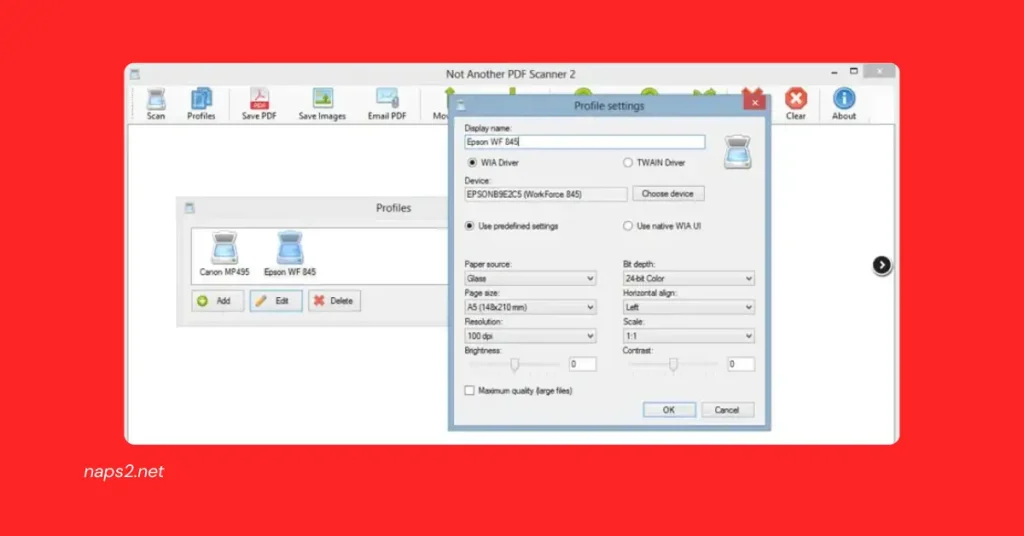
- Detailed Scan Profiles: VueScan allows for creating in-depth scan profiles with granular control over various settings, catering to users who require highly customized scans.
- More Complex Interface: VueScan’s interface might have a steeper learning curve compared to NAPS2, especially for novice users.
Choosing the Right Tool:
- NAPS2 is an excellent choice for you if:
- You prioritize an accessible and user-friendly scanning solution.
- You need essential document and photo scanning functionalities.
- You appreciate the convenience of batch scanning.
- VueScan is a better option if:
- You’re willing to pay for a license and desire advanced features.
- You have an older or less common scanner model.
- You require highly customized scan profiles with precise control.
NAPS2 vs VueScan: A Feature-by-Feature Breakdown
Here’s a detailed comparison of NAPS2 vs VueScan, highlighting their key features:
| Feature | NAPS2 | VueScan |
| Cost | Free and open-source | Paid software (license required) |
| Interface | Simpler, easier to learn | More user-friendly (some might find it complex initially) |
| Scan Settings | Basic adjustments (resolution, color mode, etc.) | Extensive controls for fine-tuning (grain removal, dust correction, detailed color adjustments) |
| Updates | Less frequent | Regular updates with new features and bug fixes |
| Scanner Support | Supports most scanners with WIA drivers | Supports a wider range, including those without WIA drivers (older/niche models) |
| Batch Scanning | Available | Available |
| Scan Profiles | Limited | Allows creating detailed profiles with specific settings |
drive_spreadsheetExport to Sheets
User Interface Comparison: NAPS2 vs VueScan
- NAPS2: Basic image editing tools (rotate, crop, brightness/contrast)
- VueScan: Features like batch scanning and scan profile saving (mentioned incorrectly under NAPS2 in your outline)
Choosing the Right Tool:
Select NAPS2 if:
- You prioritize an accessible and user-friendly solution.
- It would be best if you had basic document and photo scanning functionalities.
- You appreciate the convenience of batch scanning.
- Your scanner uses WIA drivers (most modern scanners do).
Choose VueScan if:
- You’re willing to pay for a license and desire advanced features for enhanced image quality.
- You have an older or less common scanner model not supported by WIA drivers.
- You require highly customized scan profiles with precise control over various settings.
- You value frequent updates with bug fixes and potential new features batch scanning.
Selecting Your Scanning Champion: NAPS2 vs VueScan
Choosing between NAPS2 vs VueScan depends on your specific scanning requirements and preferences. Here’s a breakdown to help you make an informed decision:
NAPS2: The Free and Friendly Option
NAPS2 shines as the ideal choice for basic scanning needs. Its key strengths lie in:
- Free and Open-Source: There are no licensing fees, making it a budget-friendly option for home users or those on a tight budget.
- Simple Interface: Beginner-friendly and intuitive, perfect for those who prefer a straightforward scanning experience.
- Basic Scanning Functionalities: Handles essential document and photo scanning needs with ease.
- Batch Scanning: Saves time and effort by efficiently scanning multiple documents at once.
- Broad Scanner Support: Works with most modern scanners that utilize WIA drivers.
Ideal Users for NAPS2:
- Budget-conscious users who prioritize a free solution.
- Individuals with basic scanning needs for documents and photos.
- Those who value a simple and user-friendly interface.
- Users with scanners that utilize WIA drivers (most modern scanners).
VueScan: Power and Control for the Demanding User
VueScan caters to advanced users who require more control and enhanced features. Here’s what sets it apart:
- Paid Software: Requires a license purchase for continued use after the trial period.
- Extensive Scan Settings: This option offers a wider array of settings for fine-tuning scan quality, including grain removal, dust and scratch removal (for photos), and advanced color adjustments.
- Regular Updates: Benefits from frequent updates with bug fixes and potential new features.
- Unparalleled Scanner Compatibility: It supports a wide range of scanners, including older and less common models that might not have WIA drivers.
- Detailed Scan Profiles: This feature allows for creating in-depth scan profiles with precise control over naps2 vuescan settings, which is ideal for users who require highly customized scans.
- Additional Features: Offers functionalities like batch scanning and scan profile saving (not available in NAPS2).
Ideal Users for VueScan:
- Advanced users who require more control over scan quality.
- Individuals with older or niche scanners not supported by WIA drivers.
- Those who need highly customized scan profiles.
- Users who value frequent updates and potential new features.
Related Article: Microsoft Lens vs NAPS2 Scanner.
Conclusion
In conclusion, navigating the world of document scanning software can be simplified by understanding the strengths of NAPS2 vs VueScan. NAPS2 excels as a free and user-friendly option for basic scanning needs, while VueScan empowers advanced users with its extensive features and wider scanner compatibility.
Whether you prioritize budget and simplicity or demand maximum control and frequent updates, both programs offer valuable solutions. By carefully considering your requirements, you can select the champion that perfectly complements your naps2 command automate scanning workflow and propels you into the realm of efficient document management.
So, evaluate your needs and make an informed decision to unlock the power of digital document organization!
FAQs
How do NAPS2 vs VueScan differ in terms of pricing?
NAPS2 is free and open-source software, meaning users can download and use it at no cost. In contrast, VueScan offers both a free trial version with limited functionality and a paid version with additional features. If users require access to the full range of features after the trial period, they can choose to purchase VueScan.
What scanning features do NAPS2 vs VueScan offer?
Both NAPS2 vs VueScan provide a range of scanning features, including support for multiple file formats (PDF, TIFF, JPEG, etc.), customizable scanning profiles, OCR (Optical Character Recognition), batch scanning, color correction, and dust removal. However, VueScan offers more advanced features in its paid version, such as batch scanning with automatic document feeders (ADF) and multi-page PDF creation.
Which scanners are compatible with NAPS2 vs VueScan?
NAPS2 vs VueScan are compatible with a wide range of scanners, including flatbed scanners, document scanners, and film/slide scanners. They both support TWAIN and WIA (Windows Image Acquisition) scanner drivers, allowing users to connect and use most scanners seamlessly.
How do the user interfaces of NAPS2 vs VueScan compare?
NAPS2 features a simple and intuitive user interface with basic scanning functionalities readily accessible from the main window. VueScan, on the other hand, offers a more comprehensive and customizable user interface with a wide range of settings and options available for advanced users. While NAPS2 focuses on simplicity, VueScan caters to users who require more control over the scanning process.
Which software is better for basic scanning tasks: NAPS2 or VueScan?
Both NAPS2 vs VueScan are suitable options for basic scanning tasks such as single-page document scanning or occasional naps2 double sided scanning needs. Users who prefer a straightforward and easy-to-use interface may find NAPS2 more appealing, while those who require more advanced features and customization options may prefer VueScan.
Latest Post